


Tap Music 3D
4.34.51K Reviews
App Specs
- Version
- 2.2.0
- Updated On
- License
- Free
- Downloads
- 5,000,000+
- Developer
- Tap Lab
- Categories
- Music
- Platform
- Android
Screenshots
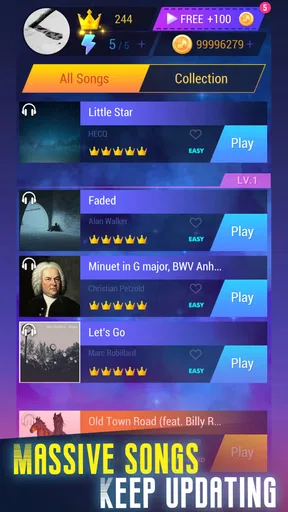
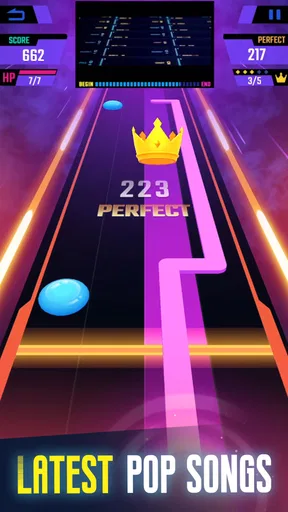
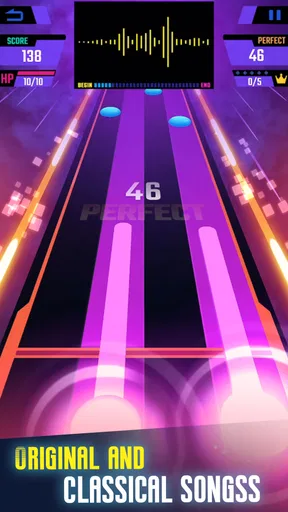
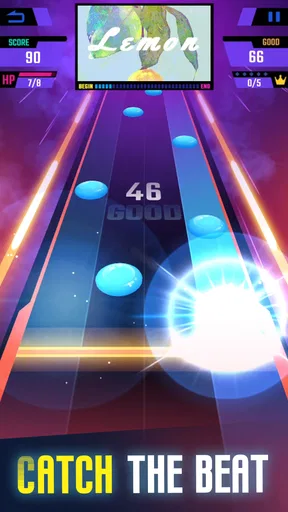
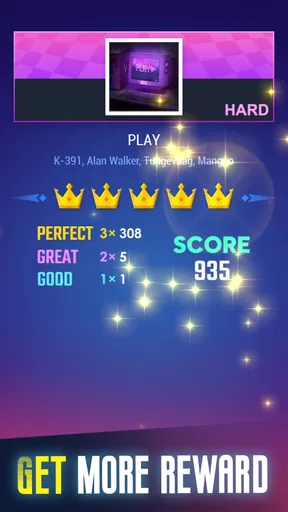
 Analysis by AppCompare
I’d describe Tap Music 3D as a quick, colorful rhythm game best suited to short bursts rather than serious music practice. Its appeal is easy to understand: follow the beat, chase a better score, and move on to another track. I like that immediate loop, though I wouldn’t choose it when I want detailed song analysis or a demanding rhythm challenge.
A quick session fits into an ordinary day
The game makes most sense in the small gaps of a day: a few minutes while waiting for a friend, a break between tasks, or a relaxed wind-down when I want something more active than scrolling. Because the central action is tapping along, I can get into a session without needing to learn a complicated control scheme. That accessibility is a real strength for casual players and for anyone who wants music-themed entertainment without committing to a long play session.
For example, if I had a short wait before heading out, I’d use a track or two to test my timing and try to beat a previous score. I wouldn’t expect that little session to teach me an instrument or improve my musical technique in a structured way. The payoff is the immediate challenge: listen, react, and see how closely my taps match the rhythm.
What the rhythm loop does well—and where it stops
The simple premise gives the game a low barrier to entry, but a good rhythm game still depends on how clearly it communicates timing. When I’m concentrating, I want the beat and the action on screen to feel connected, not like separate things I’m trying to track. The visual presentation helps make play feel lively, while the basic tap-focused approach keeps the attention on timing rather than on complicated inputs.
That simplicity has a trade-off. Players looking for instrument-like controls, detailed practice tools, or a deep music-learning experience should look elsewhere. A rhythm game can make listening more engaging, but tapping to a song is not the same as learning its notes or practicing an instrument. I’d also be cautious about expecting every session to feel equally fresh: once the basic pattern becomes familiar, the challenge depends on whether the available tracks and difficulty changes continue to hold my interest.
Choosing it over other music games
Compared with music games built around simulating an instrument, this one is the more approachable choice: its appeal is quick timing and a bright presentation, not mastering a complicated control layout. Compared with a music player, it asks me to interact with the beat instead of simply listening. That makes it a better fit when I want a small game, but a worse fit when I only want background music or a carefully organized library.
It is also worth separating score-chasing from musical skill. Trying to improve a result can make a familiar track feel newly challenging, but a leaderboard or personal best mainly rewards performance within the game. If my goal is to discover artists, build playlists, or practice rhythm in a methodical way, a dedicated music service or a more focused training app would be the more practical option.
Worth Reading Before You Choose

EA SPORTS FC Mobile 26 Is a Bigger Football Game, but It Takes Time

Flipboard Shows What News Apps Must Do Beyond the Feed

Switching to Android Auto Means Rethinking Your Driving Routine

Google Calendar Makes a Crowded Week Easier to Manage

Ludo King Makes the Most of the Minutes Between Plans

Baby Panda World Brings Quick Play to Modern Phones, but Its Game Library Feels Busy
Who should give it a try
I’d recommend it to casual players who enjoy pop-oriented rhythm games, short repeatable challenges, and visual energy. It may also work for someone introducing a friend to the genre: the basic idea is easy to explain, so nobody needs to arrive with gaming experience. Tap Lab is the developer, and the game is free to download, which makes trying it a low-commitment way to see whether this style of play clicks.
On the other hand, I’d skip it if I strongly dislike repeating songs to improve a score, want a quiet listening experience, or need a game designed around advanced musical technique. The Everyone age rating signals broad suitability, but that alone doesn’t tell me whether the gameplay will suit someone’s tastes; the more important question is whether tapping in time feels satisfying to them.
Practical details before you install
The game was released on August 28, 2019, and its current version is 2.2.0, with Android 6.0 as the minimum operating system requirement. It has a 4.3 average from around 32,000 ratings, and more than 5 million installs. Those figures suggest that it has found a sizeable audience, but they don’t guarantee that its track selection or play style will match yours.
There are in-app purchases ranging from $2.99 to $29.99 per item. Since the game is free to start, I’d first spend time with the available experience and decide whether I’m enjoying the core loop before considering any purchase. That’s a useful habit with any free game: treat optional spending as a choice, not as a requirement for having fun, and check the purchase details before confirming anything.
If you’re wondering whether it suits a quick break, that’s where I see the clearest use. If you’re wondering whether it replaces a music player or instrument-practice app, it doesn’t. And if you’re unsure whether you need rhythm-game experience, the straightforward tapping concept makes it approachable, although getting better still depends on listening carefully and repeating challenges.
For me, the deciding factor is whether I want to play along with music rather than merely hear it. When I’m in that mood, a short score-chasing session is an appealing distraction. When I want greater depth, more deliberate practice, or simply control over what I listen to, another kind of app will serve me better.
Getting Started with the Beat
First off, let’s talk about the setup. The download and installation were a breeze, and before I knew it, I was diving headfirst into a vibrant world of beats and rhythms. The interface is sleek and intuitive, which is a huge plus for those of us who are, let's say, not the most tech-savvy. You’re greeted with a simple but appealing menu that practically beckons you to start tapping away.
The Gameplay Experience
Once I fired up the game, it was all about getting in sync with the music. The premise is simple yet addictive: you tap to the beat, and the better your timing, the higher your score. It’s like Guitar Hero but more portable and, dare I say, even more colorful. The 3D graphics are on point, giving the game a dynamic and immersive feel. Seriously, those visuals pop! It’s like a party for your senses, and everyone’s invited.
The game features a wide range of tracks, from pop hits to classic melodies. I found myself jamming to some tunes I hadn't heard in a while, and it was a delightful trip down memory lane. The music selection keeps things fresh and exciting, ensuring there’s always something new to groove to.
Challenges and Levels
One thing that really stood out for me is the progression system. Tap Music 3D does a fantastic job of easing you into the more challenging levels. You start off with simpler tracks that gradually ramp up in difficulty. But don’t be fooled; even the easier levels require a good sense of rhythm. As you progress, you unlock more tracks and challenges, which keeps that competitive spirit alive and kicking.
There are also various modes to explore. Whether you’re in the mood for a quick session or ready to dive into an extended play, the game accommodates both. And if you’re a competitive soul, the leaderboard feature adds an extra layer of excitement. I found myself constantly trying to beat my previous scores and climb the ranks.
Visuals and Usability
A quick shoutout to the graphics team—seriously, the visuals are stunning. The 3D elements are not just eye candy; they enhance the gameplay by making it feel more lifelike. The animations are smooth, and the attention to detail is apparent in every frame. It’s like watching a well-choreographed dance unfold right on your screen.
As for usability, everything is pretty straightforward. The controls are responsive, which is crucial for a rhythm-based game. You don’t want any lag when you’re trying to nail that perfect combo. Thankfully, the game delivers in this department, ensuring a seamless experience.
Final Thoughts
So, after spending some quality time with the game, would I recommend it? Absolutely. It’s a fun, addictive game that combines music and gaming in a way that feels fresh and exciting. Whether you’re a music aficionado or just looking for a new game to pass the time, this app is worth giving a shot.
It’s not just about tapping to the beat; it’s about feeling the music and letting it guide you through a colorful adventure. So, if you’re ready to tap your way to the top, download Tap Music 3D and get your groove on!
Pros
- Immersive 3D graphics enhance gameplay.
- Wide variety of music tracks available.
- Responsive touch controls for smooth play.
- Regular updates with new songs added.
- Offline mode available for on-the-go fun.
Cons
- Ads can be frequent and intrusive.
- Limited free songs without in-app purchases.
- Occasional lag on older devices.
- No multiplayer mode for competitive play.
- Customization options are quite limited.
FAQs for Tap Music 3D
What is Tap Music 3D and how does it work?
Tap Music 3D is a rhythm-based mobile game that combines music with interactive gameplay. Players tap on the screen in time with the music to score points. The game features a variety of songs and difficulty levels, making it engaging for both casual players and rhythm game enthusiasts.
What devices are compatible with Tap Music 3D?
Tap Music 3D is available for both Android and iOS platforms. It is compatible with most modern smartphones and tablets running updated versions of these operating systems. However, for optimal performance, a device with a fast processor and sufficient RAM is recommended.
Does Tap Music 3D require an internet connection to play?
While Tap Music 3D can be played offline, certain features such as accessing new music tracks, in-game purchases, and leaderboards require an internet connection. Playing offline limits some interactive features, but the core gameplay experience remains accessible.
Are there in-app purchases in Tap Music 3D?
Yes, Tap Music 3D offers in-app purchases. These can include unlocking additional songs, removing ads, or purchasing special items or power-ups. While the game is free to download, these optional purchases can enhance the gameplay experience, though they are not essential for enjoying the game.
Is Tap Music 3D suitable for all ages?
Tap Music 3D is rated for players of most ages, offering easy-to-understand mechanics and a variety of music genres. However, parental guidance is suggested for younger players due to potential in-app purchases and online interactions. Always check the app’s rating and content description for more details.


